AI Squads
Propose. Validate. Learn.
Agents for level 1 and level 2 technical support
AI Squads reads the ticket, searches the knowledge of your operation and drafts an answer with its sources. The decision always stays with your team. For IT support, operations and maintenance, field service and contact centres. Built by BeAI, an AI-native lab.
100%
of answers validated by a person before they are sent
< 2 s
knowledge base retrieval, with sources linked
8
document formats the agent interprets, images included
4 to 6
weeks to go live in a typical deployment
Solving a ticket starts with finding the information
The knowledge exists, but it is scattered, and every ticket forces someone to look for it again.
Scattered knowledge
Manuals, wikis, tickets and emails, each one in its own system.
The same root cause returns
An incident already resolved reappears months later and is investigated from scratch.
Tickets that are hard to read
Long threads, screenshots, attached PDF files and several languages in the same case.
A chatbot is not enough
A system that produces plausible but ungrounded answers is an operational risk. Every answer has to be verifiable.
A typical starting point
72%
of level 1 work is repetitive tasks
45%
of incidents had already been solved before
8.5 h
mean time to resolution
Indicative references for level 1 support operations before automation. They are not figures measured at a specific customer.
Agents your team can verify
The agent proposes. A person decides. Knowledge builds up.
Reads the ticket and its attachments
Description, full thread and attachments in the supported formats, screenshots included, in whichever language they arrive.
Searches your knowledge
Across documentation and resolved tickets, in both the general knowledge and that of the affected site, with results ranked by relevance.
Drafts with sources
It presents the documents and tickets behind the draft, linked to their origin. If the ticket is missing information, it asks for it before drafting.
Explainable step by step
Numbered steps, tools used and, when the model produces one, a summary of its reasoning, all visible before you approve.
A person always decides
Validate, edit, ask for another version with more context or solve it by hand. Every attempt stays in the history.
Learns from what is validated
The approved answer is added to the knowledge base and becomes available for the next tickets.
Designed for support teams
Dashboard by role
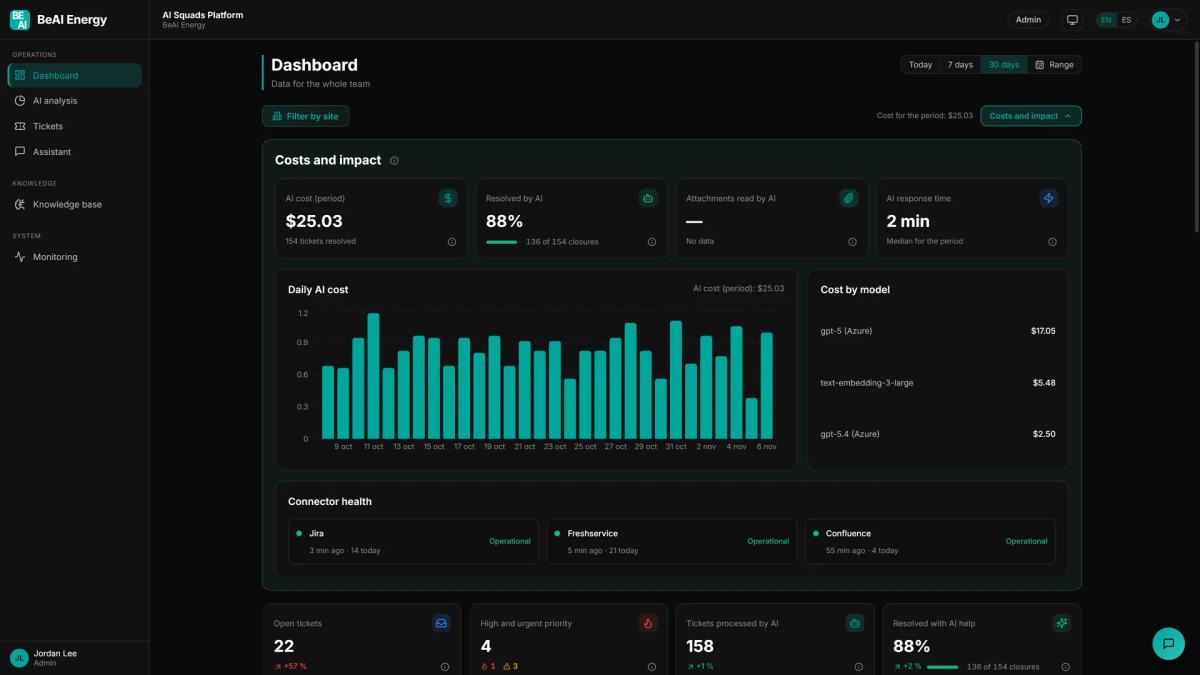
Open tickets, priorities, volume, the status of each ticket and the load per site. Agent cost and response time for those who run the service.
Integrated with your tools
Ticketing tools through their API, SharePoint and Confluence, plus manual document upload.
Posting back to the ticket
The validated answer can be sent to the requester from the ticketing tool itself, carrying the name of whoever approved it.
Assistant with files
Natural-language queries over the general or per-project knowledge, with attached documents.
Enterprise security
Administrator, operator and reader roles, sign-in with Microsoft Entra ID or with a password, and integration and model credentials held in Key Vault.
Flexible deployment
The platform and its knowledge base run in Azure, in BeAI's subscription or in your own, with vulnerability scanning on every release.
analysis of why tickets are opened · run monitoring · versioned agent instructions · project catalogue · user management · English and Spanish interface
See all thirteen featuresThe platform
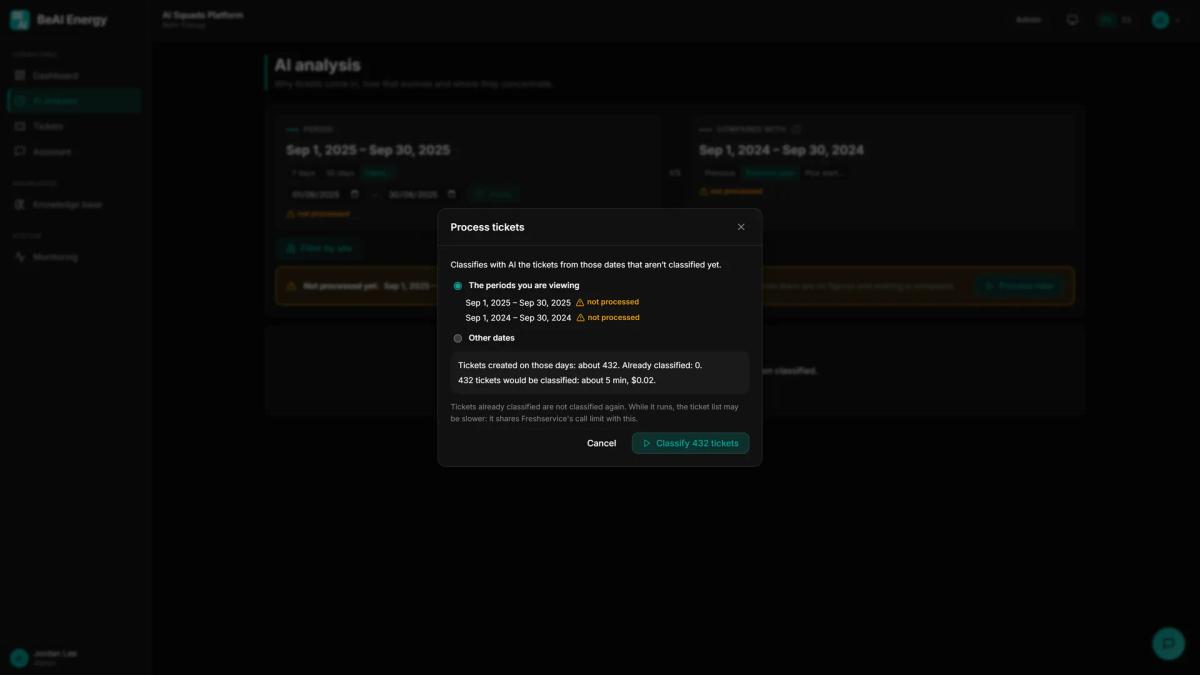
Two screens from AI Squads, with demonstration data.
From the ticket to the validated answer
Four steps, with how long each one takes on a level 1 ticket.
Connect your sources
Once, during setupSharePoint, Confluence, resolved tickets and documents.
Classify and diagnose
Triage in under 30 sThe agent reads the thread and the attachments, classifies the ticket and states the likely root cause.
Search and draft
Retrieval in under 2 sIt queries the knowledge base, ranks by relevance and writes the draft with its sources in plain view.
Validate and share
1 to 2 minYour engineer decides. What is validated joins the knowledge base and can be posted to the ticket.
1 action
to launch the agent on a ticket
4 phases
per ticket, always visible: open, processing, draft and validation
100%
of the versions of each answer, kept in the history
100%
of model calls, logged with their cost
An agent your team can audit
It is not a chatbot over your tickets: these are agents whose drafts your team can verify.
| Aspect | Automation without these guarantees | AI Squads |
|---|---|---|
| Sources | Does not show where the answer came from | Shows the documents and tickets it consulted |
| Missing information | Answers anyway | Asks for it before drafting |
| Who answers the customer | An automated reply, unreviewed | A person, always |
| Process | Not visible | Steps and tools, in plain view |
| Learning | Does not learn from what your team validates | What is validated joins the knowledge base |
| Where it runs | Outside your control | Wherever you decide: your Azure subscription or BeAI's |
| Agent instructions | Cannot be versioned | Versioned from the console |
Integrated with the tools your organisation already uses
Integration through the API and non-intrusive: nothing is installed inside your ticketing tool and its configuration is not changed.
| Category | Integration | What it is used for | Status |
|---|---|---|---|
| Tickets | Freshservice | Reads the ticket with its thread and attachments, and posts the validated answer. | Available |
| Tickets | Jira | Reads issues and uses them as a knowledge source. | Available |
| Tickets | ServiceNow, BMC Helix (Remedy), Jira Service Management, Zendesk, Freshdesk, Zoho Desk, Salesforce Service Cloud, HubSpot Service Hub, Ivanti Neurons, ManageEngine ServiceDesk Plus, TOPdesk, GLPI and any other tool with an API | Ticket reading and posting of the validated answer, through the API and with nothing installed in the tool. | Integrated during the project |
| Documentation | SharePoint (Microsoft Graph) | Ingestion of general and per-project documentation. | Available |
| Documentation | Confluence | Ingestion of pages and their attachments. | Available |
| Documentation | Manual upload | Standalone documents, from the console. | Available |
| Identity | Microsoft Entra ID | Sign in with the corporate account. | Requires registering the application |
| Identity | User and password | For teams that do not use Entra ID. | Available |
| Models | Azure OpenAI | Language models, vision models and embeddings. | Available |
| Models | Azure AI Document Intelligence | Reading of text and tables, and of the figures inside PDF files. | Available |
| Models | Cohere Rerank (Azure AI Foundry) | Ranks search results by relevance. | Available |
| Models | Classification model (Azure AI Foundry) | Sorts every ticket into your team's list of reasons, with its confidence level. | Available |
Azure components
Container Apps · Blob Storage · Storage Queue · Key Vault · Azure DocumentDB (MongoDB)
Formats the agent interprets
PDF · DOCX · PPTX · HTML · JPG · PNG · TIFF · BMP
One platform, several domains
AI Squads is organised into applications, each with its own agents, knowledge and users, under a single portal. Level 1 support is the first one. Domain-specialised agents, for example business application support, field service or phone-based customer care, are built on the same foundation.
Retrieval engine
95%
accuracy within the top five results
< 2 s
end-to-end retrieval
100%
of drafts, with their source linked
Indicators measured by the platform itself over its execution logs.
How it is built
Agent architecture in production: every decision is traceable, measurable and governed.
Agentic architecture
The agent breaks each ticket into steps and tools: reading, classification, retrieval and drafting. Every step is logged and visible before approval.
Evidence-based retrieval
Semantic search over documentation and resolved tickets, with relevance reranking through Cohere Rerank. Every draft links the sources behind it.
Document understanding
Azure AI Document Intelligence and vision models extract text, tables and figures from PDF files, presentations and images, screenshots included.
Classification with confidence
A classification model assigns each ticket to the list of reasons your team defines and reports the confidence of each assignment.
Agent governance
Instructions versioned from the console, with full history and controlled activation of each version.
Observability and cost
Every model call is logged with its duration and cost, and retrieval quality is measured over the execution logs.
Value for every role in the organisation
Support engineer
Every case starts with the ticket already analysed and a grounded draft to review, not with a blank page.
Support manager
They see the state of each ticket, the load per site and why tickets come in. Every validated answer keeps its sources and the name of whoever approved it.
Management
What the team validates, and the resolved tickets the platform ingests, become knowledge anyone can query. Agent cost is measured.
IT and security
The platform runs in your cloud or in BeAI's, with credentials in Key Vault, roles per user and a log of every run.
Deployment targets
| Metric | Starting point | Target with AI Squads |
|---|---|---|
| Mean time to resolution | 8.5 h | 60 min |
| First contact resolution | 35% | 82% |
| Cost per level 1 ticket | €70 | €23 |
100%
of answers traceable to their sources and to whoever validated them
95%
requester satisfaction as a target
50%
reduction in service cost as a target
Targets for a typical deployment, estimated from BeAI experience in support operations. They are not results measured at a specific customer.
For teams that solve technical problems at scale
Wherever there are tickets and levels 1 and 2 absorb the team's capacity.
IT support and service desk
Internal or outsourced service desks, with an incident catalogue and service level agreements to meet.
Operations, maintenance and field service
Teams supporting systems installed across many sites, each with its own configuration, and coordinating interventions.
Contact centres and BPO
High volumes, recurring root causes and a demand for quality and traceability in every answer.
It fits if
- You receive hundreds or thousands of tickets a year and many root causes repeat.
- Your technical documentation is scattered and hard to find.
- Your team supports several sites, countries or languages.
- You need a person to approve every answer that reaches the customer.
- You want to decide where the solution runs: in your own Azure subscription or in BeAI's.
A different scenario? Let's discuss it.
Built by an AI-native lab
BeAI designs, builds and runs agents, evidence-based search engines and automation architectures in production. AI Squads is the result of that practice applied to technical support.
Applied research
A lab working on agents, evidence-based retrieval and continuous evaluation. What is proven in the lab becomes product.
Production engineering
A standard, auditable architecture in Azure, deployed in your subscription or in BeAI's. No black boxes, no hidden dependencies.
Human oversight by design
The agent extends your team's judgement rather than replacing it. The final decision always rests with a person.
Frequently asked questions
Does the agent answer my customers on its own?
No. The agent drafts and a person validates. Only a validated answer can leave AI Squads, carrying the name of whoever approved it.
What if the agent gets it wrong?
Nothing goes out unvalidated. The engineer sees the sources and the process before approving, and can edit the text, ask for another version or write the answer themselves. The final version is what reaches the knowledge base.
Does it process tickets automatically as they arrive?
No. The engineer launches the agent from the ticket with a single action. Batch processing, to classify the tickets of a period, is launched by an administrator.
Can I find out why tickets come in?
Yes. The classification engine sorts every ticket into a list of reasons your team defines, and the analysis shows how many there are of each one, per site and against another period.
Do I have to install anything inside my ticketing tool?
No. The integration runs through the API and is non-intrusive: AI Squads reads the ticket, drafts an answer and, if you configure it, posts the validated reply. No add-on is installed in your tool and its configuration is not changed.
Where is my data?
Wherever your organisation decides: the deployment model is your choice. The platform, its knowledge base and its logs run in Azure, either in BeAI's subscription or in your own, with the Azure OpenAI and Document Intelligence resources. Either way, your tickets and documents stay in their source systems.
Does it work with my ticketing system?
Freshservice and Jira are available today. ServiceNow, Remedy, Freshdesk and any tool with an API are integrated during project setup.
How long does it take to go live?
Four to six weeks in a typical deployment: connect the sources, load the knowledge, tune the agent instructions and validate with your team on real tickets.
Which languages does it work in?
The interface is available in English and Spanish. The agent reads tickets in whichever language they arrive.
Do I need Microsoft Entra ID?
No. If you have it, people can sign in with their corporate account; if not, an administrator creates each user with a password.
100%
of answers validated by a person
4 to 6 weeks
to go live in a typical deployment
EN · ES
interface in two languages